Human in the loop

AI drafts every reply.
You approve it.

The one promise this whole product is built around: nothing reaches a customer without a human deciding it should.

The fear, named

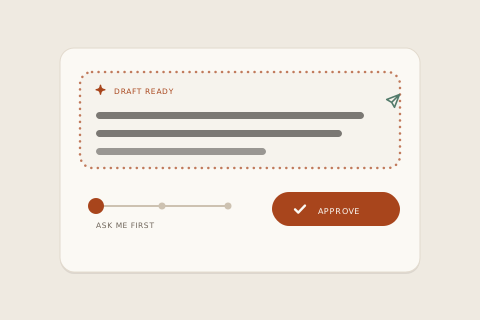
“What if the AI says something wrong to my customer?” With inrelay the answer is structural: the AI produces drafts, and drafts cannot send. A human reads, edits if needed, and approves — or the message never leaves. AI drafts you approve, not AI that answers for you.

Looping animation: a draft waits, the autonomy dial is set to ask first, and you press approve.

Every AI support tool gets asked the same question, and most answer with a settings page. We answer with the product's architecture. Here is exactly how the approval gate works, what the autonomy dial changes, and the short list of things the agent will never do without you.

01 · The gate

How the approval gate works

When a message arrives — a DM, an email, a chat — the agent reads it, tags the intent, and writes a draft in your voice. That draft lands in one place: the review queue inside the conversation, marked as unsent, with the customer's message, the order context, and the agent's reasoning beside it.

Sending requires a person. Specifically:

The draft waits in the thread

It is visibly a draft — styled as the agent's material, not as a sent message. Customers never see drafts, ever.

A teammate reads it

Edit it, rewrite it, or use it as-is. The draft is a head start, not a verdict. Most edits take seconds because the voice already matches yours.

Approve & send is the only exit

One deliberate action, taken by a signed-in human, sends the reply. There is no timer that sends it for you, and no “send unless you object” mode.

If nobody approves, nothing happens. The customer's message stays owned and visible — triaged, drafted, waiting — but silence from your team means silence from the product.

02 · The dial

The autonomy dial, per workspace

Approval is the default, not the ceiling. Each workspace has its own autonomy dial, and you move it deliberately — for one brand, one channel mix, one team at a time. Autonomy is never a global switch someone flips by accident.

Passive

The agent observes

It reads, tags intent, and routes — but writes nothing. For teams that want triage without any drafting at all.

Active · default

The agent drafts

Every reply is written and waiting, and every reply waits for approval. This is the mode this page describes, and the one every workspace starts in.

Auto

You delegate, explicitly

You choose narrow, low-risk intents — an order-status lookup, say — that may send without review. You opt in per workspace; it is never the default.

The dial only ever moves when an owner moves it. Turning it up is a decision you make with full knowledge of what you're delegating; turning it back down takes one click and applies immediately.

03 · The hard lines

What it never does without you

The explicit list. In the default mode, the agent will never:

  • Send a reply. Drafts are inert until a human approves them.
  • Promise a refund, discount, or exception. It can draft one for your approval; committing money is a human call.
  • Close a conversation. It suggests when a thread looks resolved; a person confirms.
  • Contact a customer first. It only ever drafts responses to messages your customers send you.
  • Raise its own autonomy. The dial moves when an owner moves it, and at no other time.

Even in auto mode the boundaries hold: only the intents you named send on their own, everything else drops back to a waiting draft, and the full transcript of what sent and why stays in the thread.

04 · The argument

Why full autopilot fails support

The honest argument, since the rest of the market is racing the other way. Autonomous resolution is a wonderful demo and a miserable policy: the conversations that matter most — the angry ones, the ambiguous ones, the ones involving money — are exactly the ones a language model is most likely to get expensively wrong. Tools that bill per “resolution” are also paid more the more the bot handles alone, which is an incentive pointed directly away from your customer.

Our model is different on purpose. Drafting is where AI is genuinely superhuman — fast, consistent, never tired at midnight. Judgment is where your team is irreplaceable. inrelay splits the work exactly on that line, and prices it flat so we earn nothing extra when you delegate more. The result reads obvious in hindsight: customers get answers that sound like you, and you get the time back without ever handing over the keys.

It's the same reason the whole inbox is built around ownership — triage and routing put every thread in one person's hands, collision detection keeps two people from answering at once, and the copilot writes the first draft of nearly all of it.
Start today

Keep the keys. Lose the grind.

The agent drafts all night; you approve over coffee. Start free and feel the difference in a week.

The trust questions.

Will the AI ever reply to my customers by itself?
Not unless you explicitly turn on auto mode for specific intents in a specific workspace. Out of the box, every reply — all of them — waits for a human to approve it.
What happens if nobody approves a draft?
Nothing sends. The conversation stays in the inbox, assigned and visible, with the draft attached. The agent never escalates silence into a send.
Can I edit a draft before it goes out?
Yes — the draft is an ordinary editable message. Change a word or rewrite the whole thing; your edits also teach the voice over time.
Who can change the autonomy dial?
Workspace owners. It's a deliberate, per-workspace setting — not something a new teammate can toggle, and not something the agent can change about itself.
Does “human in the loop” slow replies down?
It adds one glance. Drafts are ready the moment you open the thread, so the human step is seconds — and overnight the inbox still works itself down into a morning brief instead of sending while you sleep.

Start running your DMs.

Give your customers faster answers and your team their evenings back.

Desktop and mobile. Free for solo.