Email channel

Team email management software for one calm support@

Gmail, Outlook or plain IMAP — one shared address the whole team works together, without forwarding chains or a shared password.

The short answer

inrelay is team email management software that turns a shared address like support@ into one inbox a whole team runs together. Connect Gmail, Outlook or any IMAP mailbox; every email becomes an owned conversation with an assignee, internal notes, collision detection and a draft reply from the AI agent waiting for a human to approve — on every plan, including the free one.
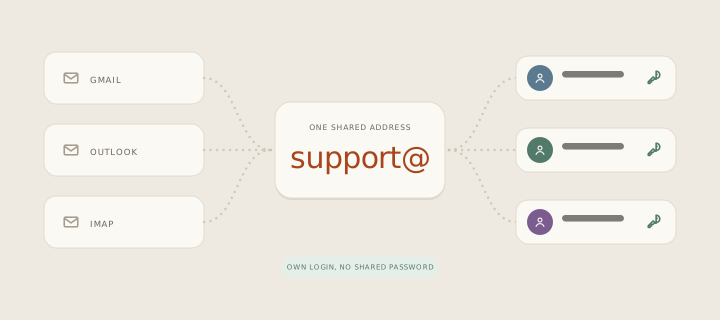
Looping animation: Gmail, Outlook and IMAP mailboxes converge on one shared support@ address, then the conversation fans out to three teammates, each with their own login.

The address your customers write to doesn’t change. What changes is what happens behind it: instead of five people watching one mailbox and hoping somebody answers, every email lands as a conversation with a clear owner, a status, and a place for the team to talk about it privately before anyone replies in public.

Email is the channel where most support still lives, and the channel where shared-password mailboxes quietly fail — two replies to the same customer, or none at all. Team email management software exists to remove exactly those two failure modes.
01 · From the inbox

What you can do from the inbox

Everything below works today, on email, from the desktop app and the mobile companion.

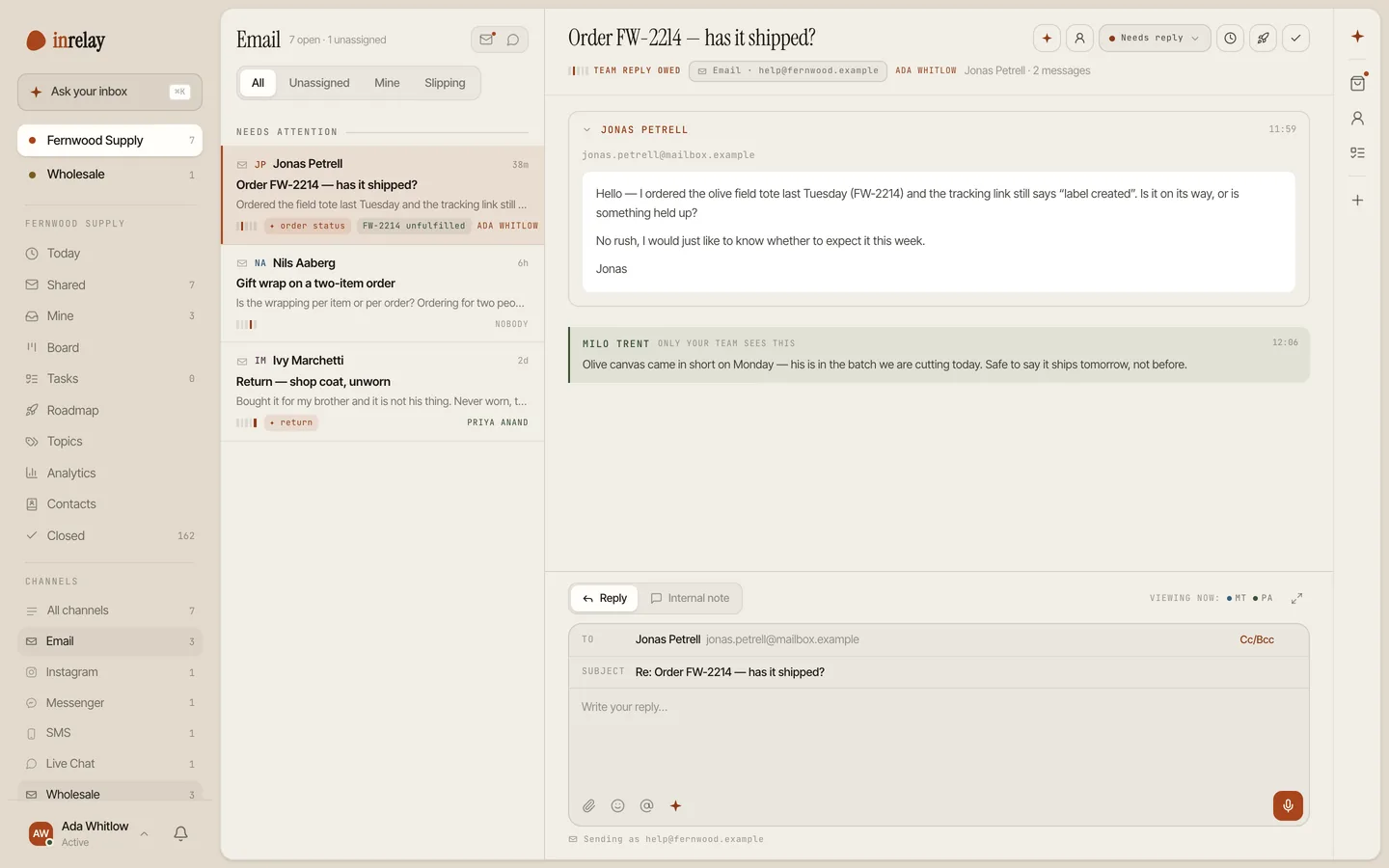
One email conversation in the shared inbox: an owner, an internal note only the team sees, and the reply box open
  • Assign every email an owner. One name on every conversation, so “I thought you had it” stops being a sentence anyone says.
  • Talk privately, next to the thread. Internal notes and @mentions sit beside the customer conversation — a mention is always a note, never something a customer can see.
  • See who’s already on it. Collision detection shows when a teammate is viewing or replying, so duplicate answers stop before they’re typed.
  • Approve AI drafts, don’t write from scratch. On every plan, the AI agent reads each email, tags intent and drafts a reply in your voice. Nothing sends until you approve it.
  • Keep status honest. Conversations move through new, needs reply, waiting and slipping — in a list or a board — so the ones going stale surface on their own.
  • Use the small conveniences that add up. Snippets, scheduled sends, attachments, snooze and close shortcuts, and a CSAT survey after resolution if you want one.
02 · Setup

Setup & permissions

Connecting email takes minutes, but email as a platform has real requirements, so here is the honest version of what setup involves.

Connect the mailbox

Sign in with Google or Microsoft to connect Gmail or Outlook, or use server details for any IMAP mailbox. The connection is granted to inrelay once — teammates never see or share the mailbox password.

Set up your sending domain

Replies go out from your own address, and inbox providers only trust mail from domains that vouch for it. That means adding SPF, DKIM and DMARC records at your DNS host — a ten-minute, one-time job we walk you through, and the single biggest thing you can do for deliverability.

Invite the team

Teammates get their own logins and see the shared workspace you give them access to. Deep workspace configuration stays on desktop by design; triage and replies work everywhere.

Start answering

New email flows in as conversations from the moment the mailbox connects. Assign the first one and you’re running.

03 · The limits

Limits, stated plainly

Email is the most open channel there is, but a few constraints are worth knowing before you commit to any tool, including this one.

Deliverability is earned, not bought. No email software can promise the inbox. If your domain’s SPF, DKIM and DMARC records aren’t set up, replies can land in spam — which is why domain setup is a first-class step above, not a footnote.

Email conversations are never metered. Plans are flat — no ticket caps, no per-conversation fees, no add-on packs to buy in a busy month. A spike in customer email changes nothing about your bill.

The agent runs on a reply budget you set. The AI agent — drafts, triage, routing — is on every plan, including the free one. The only number in inrelay is its monthly reply budget, which you set and can see. When it runs out the agent pauses and the inbox keeps working — no overage fee, and nothing upgrades on its own. We’d rather say that here than surprise you at checkout.

04 · The other channels

With your other channels.

Email is one lane of the same inbox. Live chat ships today; social and SMS are in development — not shipped yet, so we won’t pretend otherwise.

ALL CHANNELS

Every channel

The full list of what inrelay connects today, in one omnichannel inbox.

See all channels →
LIVE CHAT

Live chat

A widget on your site with a human handoff — chats land beside your email in the same queue.

Live chat channel →
SOCIAL

Instagram DM

DMs as owned conversations, same assignment and approval flow.

In development
COMMERCE

TikTok Shop

Shop messages next to email, with order context where it belongs.

In development
MESSAGING

SMS

Text conversations in the same shared inbox, with the same owners.

In development
MESSAGING

WhatsApp

The channel half your customers already prefer, when it’s ready.

In development
Start today

Give support@ an owner.

Connect Gmail, Outlook or IMAP in minutes — your address, your history, a calmer front end.

Questions, answered.

Does inrelay work with Gmail and Outlook?
Yes. Connect Gmail or Google Workspace addresses and Outlook or Microsoft 365 mailboxes by signing in, or connect any other provider over IMAP. Your address stays exactly as it is — customers notice nothing except faster answers.
Can several people use one support@ address without sharing a password?
That’s the point of team email management software. The mailbox is connected once; every teammate works it through their own inrelay login, with assignment, notes and collision detection instead of a password on a sticky note.
Will the AI reply to my customers on its own?
No. The agent reads, tags and drafts — a reply only sends when a human approves it. If that gate matters to you as much as it does to us, the approve-before-send page spells out exactly what the AI never does without you.
How is email usage counted?
It isn’t. Plans are flat and email conversations are never metered — no ticket caps, no overage fees. The only number in inrelay is the AI agent’s monthly reply budget, which you set: when it runs out the agent pauses and the inbox keeps working. Details on the pricing page.

Start running your DMs.

Give your customers faster answers and your team their evenings back.

Desktop and mobile. Free for solo.