AI chatbot

An AI chatbot with human handoff and no per-resolution fee

It answers from what you have written, hands over the moment it should, and never surprises you with a bill for being useful.

The short answer

An AI chatbot with human handoff answers customer questions automatically and transfers the conversation to a person when it cannot help. The inrelay chatbot answers live-chat visitors from your knowledge base and sources, declines the subjects you mark off-limits, and hands off to a named teammate with the whole conversation attached.
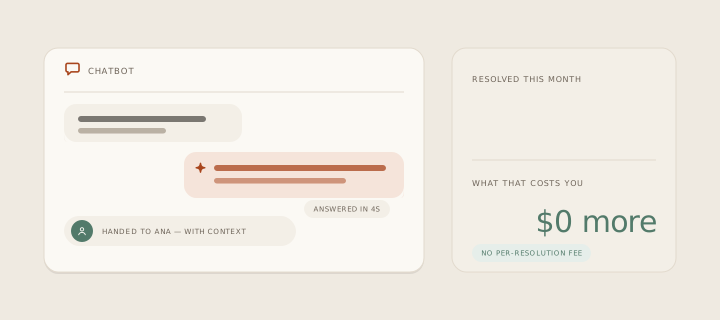
Looping animation: the chatbot answers in four seconds, hands the conversation to Ana with the context attached, and the month’s resolution count climbs while the bill stays at no extra cost.

What it prevents is the loop. Everyone has argued with a bot that would not let go — rephrasing the same question four times, hunting for the word that unlocks a human. A chatbot is only worth having if the exit is as good as the answer, which is why the handoff on this page gets more attention than the answering does.
01 · Grounded, not guessing

How it works in inrelay

The chatbot answers from your own material — published help articles and the knowledge sources you have added — rather than from a model’s general impression of your business.

That grounding is a setting, not a hope. Each source you add carries its own switch for whether the chatbot may cite it, so an internal policy document can inform your team without ever reaching a customer. When the search finds nothing solid, the bot does not improvise — it escalates.

  • It answers live chat, in your widget, under a name you choose — so nobody mistakes it for a teammate. Every question it takes is deflected before it reaches your queue.
  • Always, or only after hours. Run it around the clock, or let humans take the day and the bot take the night, using the business hours you already set.
  • It checks its own work. After answering from your knowledge it can ask whether that actually helped — and treat “no” as a reason to fetch a person.
  • It says it is an AI. A small tag on every bot message, on by default, because labelled bots are trusted more rather than less.
  • Live chat today. The chatbot answers visitors in the widget — email threads still come to you with a draft waiting, which is a different and deliberately more careful thing.
02 · The exit

What the handoff actually does

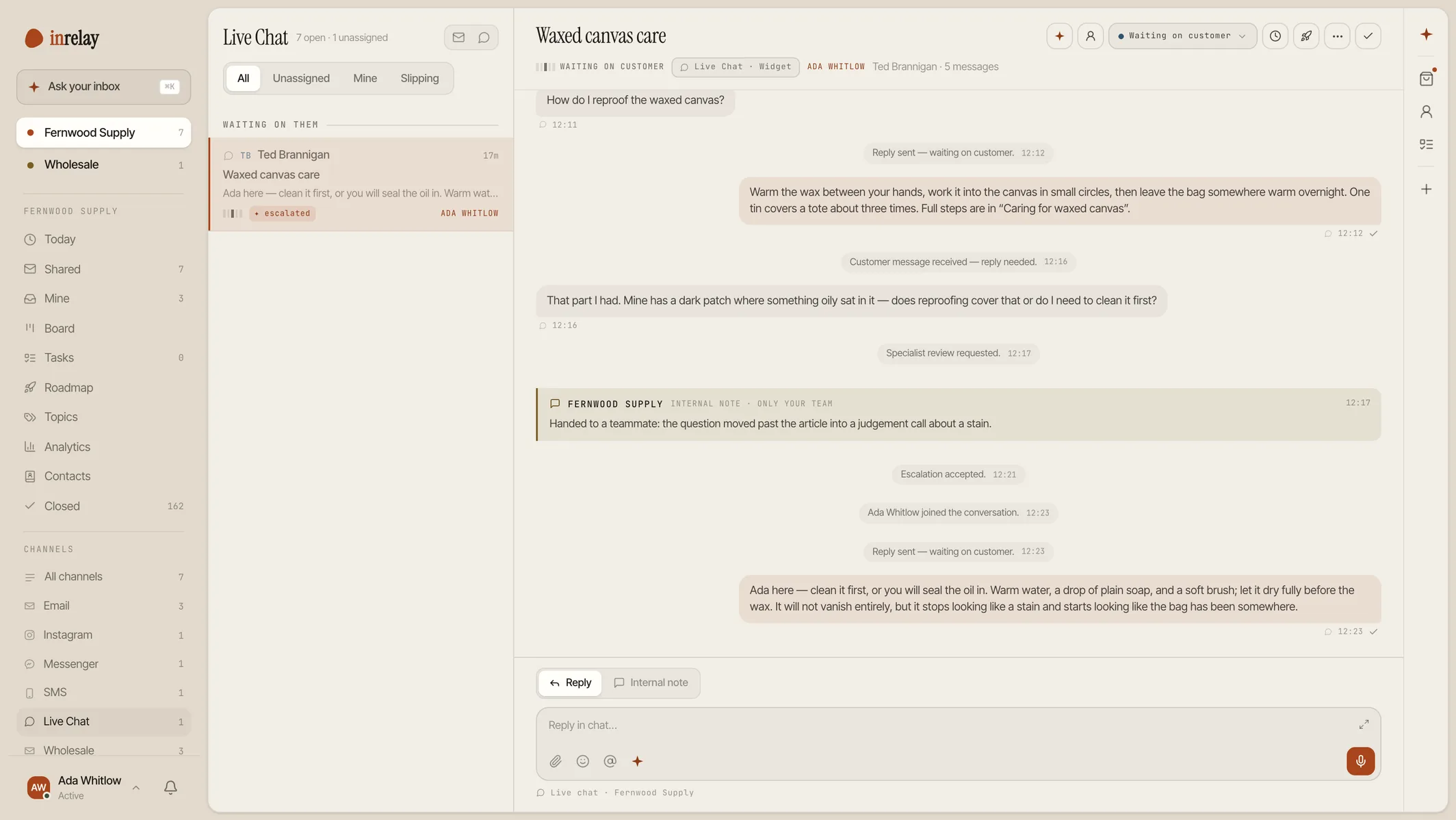
A handoff in inrelay is not a message saying somebody will be in touch. It is a real escalation — a change of state on the conversation: the thread is marked as waiting on your team, it starts needing a reply, any snooze is cleared, and — if you named one — it lands on a specific teammate while everybody else is still notified that it happened.

Three things trigger it. The visitor asks for a person. The question touches a subject you marked restricted. Or the bot has gone several messages without resolving anything and you have told it to stop trying. In each case it says the handoff line you wrote, and it can collect an email first so the conversation survives the visitor closing the tab.

An escalated chat landing in the inbox
03 · Your guardrails

The dials are yours

Every one of these is a field on one settings page, not a support ticket to us:

  • Restricted topics. A list, one per line. Refunds above your policy, legal or tax advice, anything about a custom order — the bot declines and hands off instead of improvising.
  • A rollout percentage. Start the bot on a slice of new conversations rather than all of them. A conversation stays with whoever picked it up — the dial never flips someone mid-chat.
  • Escalate after N messages. Cap how long the bot may keep trying before it fetches a person, or leave it blank and let it judge.
  • A monthly reply budget. The number of replies the bot may send this month. Past it, every chat simply goes to the team until the month rolls over.

That last one is the whole trust argument in one field, so it is worth being precise about: the budget is a ceiling you choose, and running into it costs you nothing but the bot going quiet.

04 · The night shift

Why it matters

For a team of one to five, the chatbot is not about deflection targets. It is about the eleven hours a day nobody is at a desk. A visitor with a sizing question at midnight either gets an answer from your own help article or leaves; there is no third option where you wake up and catch them. For ecommerce and DTC teams that hour is where most of the “where is my order?” volume lands.

The reason to be careful about which answers it gives is the same reason to have it at all. Getting a wrong answer at midnight is worse than getting none — so the shape that works is a bot confined to what you have actually written, with a short leash and a fast exit to a human.

05 · No meter

How inrelay does it differently

The rest of the category bills the bot by the answer. Intercom’s Fin charges $0.99 per resolution, Help Scout $0.75, Zendesk $1.50 to $2.00, and Gorgias meters an AI resolution and the ticket underneath it. The arithmetic is uncomfortable once you see it: a good month for your business is an expensive month for your support bill, and the tool you bought to save money charges most exactly when you are busiest.

No per-resolution fees. Ever. The agent’s work comes with the plan. You set your AI budget. The reply budget is a number you type, visible before the bot goes live and changeable after. No silent upgrades. Nothing about a busy December moves you onto a bigger plan on its own.

What that buys, besides money, is a chatbot you can be relaxed about. When every bot answer is a charge, the incentive quietly runs the wrong way — the vendor wants the bot to resolve, and you want it to hand off. Here nobody is paid by the answer, so the only question left is whether the answer was any good.

Competitor rates as of August 2026, from the vendors’ own pricing pages — the same set used on pricing.

06 · Set-up

Setting it up

Give it something to read

Publish a few help articles or add a source — your site, your docs, a policy document. The bot answers from these and nothing else.

Write the guardrails

Name the restricted topics and the teammate escalations should land on, and write the handoff line in your own words.

Set the budget, then go live

Choose the monthly reply budget and whether the bot works all day or only after hours. Start at a small rollout percentage if you would rather watch first.

Read the transcripts for a week

Every bot conversation is in your inbox like any other. The ones it got wrong are usually a missing article, not a broken bot. The help docs cover each setting.

The chatbot is on every plan, including the free one — governed by the reply budget you set, never by a per-answer charge.

07 · Close neighbours

Works with the rest of the inbox.

The chatbot is one piece of the inrelay feature family — these are its closest neighbours.

Start today

A bot that knows when to stop.

Free to start with your own inbox — every feature, no card, never per seat.

Questions, answered.

How does a customer reach a human?
By asking. The bot hands off on request, on a restricted topic, or after however many unresolved messages you allow — and the handoff is a real state change: the thread waits on your team, needs a reply, and can be assigned to a named teammate while everyone else is notified.
Will it make things up about my business?
It answers from your published articles and the sources you have added, each with its own switch for whether the bot may use it. When the search comes back empty it escalates rather than improvising, and any subject on your restricted list is declined outright.
What does the AI cost per conversation?
Nothing. No per-resolution fees. Ever. The agent is included in every plan and governed by a monthly reply budget you set yourself — when it runs out, chats go to your team until the month rolls over. No silent upgrades either.
Can I try it on a few conversations first?
Yes. Set a rollout percentage and the bot only takes that share of new conversations; the rest come straight to you. A conversation stays with whoever started it, so nobody is handed from a person to a bot mid-chat.

Start running your DMs.

Give your customers faster answers and your team their evenings back.

Desktop and mobile. Free for solo.