For logistics

Shared inbox for logistics teams — every load owned

One dispatch@ the whole ops team works together — track-and-trace answered fast, exceptions surfaced first, PODs where you can find them.

The short answer

The email problem in logistics is volume with consequences. One dispatch@ takes track-and-trace requests, rate confirmations, PODs and exceptions all day — and a single missed message can be a missed pickup. A shared inbox for logistics gives every load-related thread an owner, keeps documents on the conversation, and surfaces the exception before the angry check call.

Most ops teams live in a mailbox that never stops: a shipper asking where a load is, a carrier returning a rate con, a consignee refusing two pallets, a factoring company chasing a POD — all interleaved, all urgent-looking, only some actually urgent. Whoever opens the mailbox first plays human router for everyone else.

The failure mode isn’t dramatic. It’s the exception email that sat fourth in an unread pile for ninety minutes behind three routine status requests.

01 · What teams need

What logistics teams actually need

Track-and-trace that doesn’t eat the day. “Where’s my load?” is most of the inbound, and every reply is the same shape: status, location, ETA. The work isn’t hard — it’s constant, and it buries everything that matters more.

Exceptions surfaced first, not in arrival order. A rejected delivery, a driver stuck at a closed receiver, detention starting to accrue — these can’t wait behind routine status mail. A plain mailbox sorts by time; an ops team needs sorting by consequence.

PODs and paperwork that stay with the load. Rate cons, lumper receipts, PODs — when documents live in whichever personal inbox received them, invoicing waits and disputes get ugly. The paper trail belongs on the load’s thread.

Clean handoffs between shifts. Freight doesn’t keep office hours. The evening dispatcher picking up dispatch@ needs to see what’s owned, what’s waiting on a carrier and what’s about to blow up — without a verbal download in the parking lot.

Carriers and shippers kept straight. A carrier negotiating detention and a shipper asking for an ETA are different conversations with different stakes; they shouldn’t share one pile.

02 · The fit

How inrelay fits

inrelay is a shared inbox for logistics teams that turns dispatch@ into a queue with owners, urgency and — on every plan — a drafted reply waiting for a human to approve. Requirement by requirement:

What logistics teams need
How inrelay meets it
Track-and-trace without the grind
Triage tags status requests as they arrive and routes them to whoever owns that customer; the AI agent drafts the reply shape in your voice, and the dispatcher drops in the position and ETA from your TMS before approving.
Exceptions jump the queue
Intent tagging separates an exception from a routine status ask, and statuses — new, needs reply, waiting, slipping — keep the thread that’s going stale from going invisible.
Paperwork stays with the load
PODs and rate cons arrive as attachments on the conversation, and internal notes hold the load number and decisions right beside the customer-facing thread — one place to look when billing asks.
Shift handoffs without the download
Every thread shows its owner, status and notes, so the next shift reads the queue instead of someone’s memory. Collision detection keeps two dispatchers off the same carrier thread.
Carriers and shippers kept straight
Connect dispatch@, carriers@ and support@ as separate shared inboxes, each with its own queue — and since pricing is flat and teammates are never priced, the whole ops floor works them without per-seat math.

One honest note: the AI agent — recurring drafts, triage and routing — runs on every plan, governed by a monthly reply budget you set, and it only knows what’s in the thread. Truck positions live in your TMS; drafts speed up the writing, your dispatcher stays the source of truth.

03 · One load

A workflow example, pickup to POD

What one load’s worth of email looks like when a shared inbox for logistics is doing its job. (The load is invented; the pattern isn’t.)
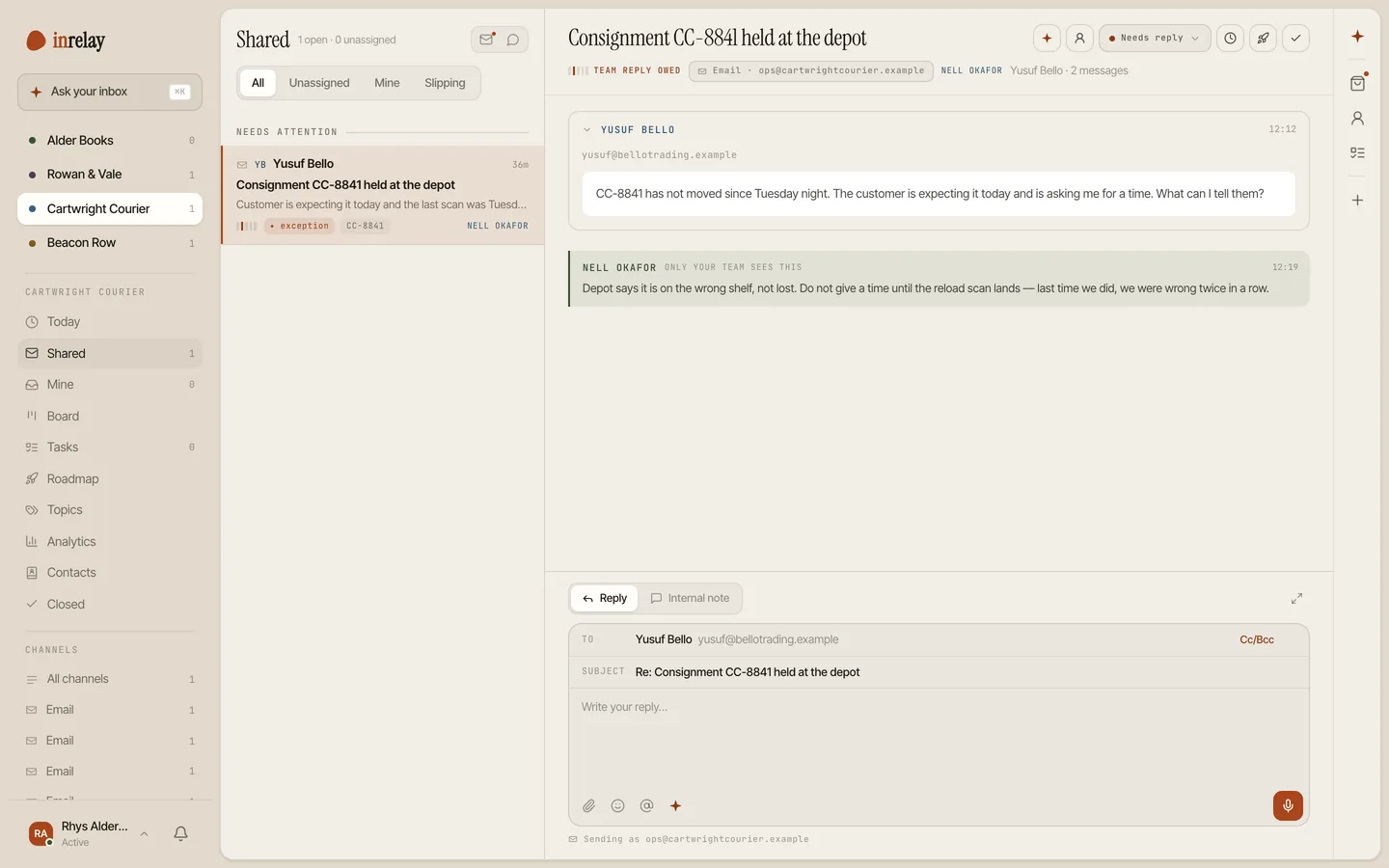
An exception thread tagged urgent with an owner and internal note

6:10 am — the status ask

A shipper emails dispatch@: “Where’s load 4417?” Triage tags it track-and-trace and routes it to the dispatcher who owns that account. A draft is already waiting; she checks the TMS, adds the position and ETA, and approves. Two minutes, start to sent.

11:40 am — the exception

The consignee refuses two damaged pallets. That email is tagged as an exception and lands at the top of the queue, not fourth under routine mail. The ops lead takes ownership and leaves a note where the team can see it: “carrier disputing, photos requested.”

3:15 pm — the paper

The carrier replies with photos and, later, the signed POD. Both land as attachments on the same thread — not in one dispatcher’s personal inbox.

Next week — the follow-up

The shipper’s claims question arrives and reopens the same conversation: history, notes, photos and POD in one scroll. The evening shift could answer it cold — which is the whole point.

04 · Integrations

Integrations that matter here

The plain truth: inrelay has no TMS, EDI or load-board integrations today, and this page won’t dress that up. What it has is the channel most freight communication already runs on — email:

  • Everything that arrives by email already works. Rate confirmations, POD emails from carriers, tracking notifications from visibility platforms — they all land in the shared email inbox, get triaged and get an owner like any other thread.
  • Live chat for shippers who won’t email. The chat widget on your site gives customers a faster lane for quick status questions, landing in the same queue as dispatch@.
  • A knowledge base for the repeat questions. Accessorial policies, claims procedures, detention terms — written once on your own domain, linked instead of retyped.
  • No native TMS sync — McLeod, Turvo and friends don’t connect directly today, so positions and ETAs still come from your TMS by hand. If a specific integration would change your answer, name it; that’s genuinely how the roadmap gets ordered.
  • No EDI, and SMS — how half your drivers communicate — is in development, not shipped. Both appear here when they’re real.
05 · Nearby

Other teams, same shape.

The vertical changes, the mailbox problem doesn’t. See how the same shared inbox fits other kinds of work.

Start today

Give every load thread an owner.

Connect dispatch@ in minutes — one flat price, the whole ops floor on it.

Questions, answered.

Can dispatch@ be worked across shifts without dropping threads?
Yes — that’s what a shared inbox for logistics is for. Every thread carries an owner, a status and internal notes, so the night dispatcher reads the queue instead of relying on a handoff conversation, and collision detection stops two people answering the same carrier.
How does inrelay handle “where’s my load” emails?
Triage tags them as track-and-trace and routes them to the right dispatcher; on every plan the AI agent leaves a drafted reply in your voice. The dispatcher adds the position and ETA from your TMS and approves — the AI never invents a truck location, because it only knows what’s in the thread.
Does inrelay integrate with our TMS or load boards?
Not natively, and we’d rather say so up front. Everything that reaches you by email — rate cons, PODs, tracking notifications — flows in because it’s email, but there’s no direct TMS, EDI or load-board sync today. If one integration would tip the decision, tell us which.
Will the AI answer a shipper on its own?
No. The agent reads, tags, routes and drafts — nothing sends until a person approves it. In freight, a wrong ETA is a real cost, so the human gate isn’t a disclaimer, it’s the design; approve-before-send spells out exactly what the AI never does alone.

Start running your DMs.

Give your customers faster answers and your team their evenings back.

Desktop and mobile. Free for solo.