Solutions · Legal

Shared inbox for law firms where every message has an owner

Intake answered before the other firm picks up, client email that can’t fall through a partner’s mailbox, and nothing sent until a person at the firm approves it.

The short answer

inrelay is a shared inbox for law firms: connect intake@ or office@ once, and every client email becomes a conversation with a named owner, a visible status, and a private space for the team to confer beside the thread. Access is scoped by workspace, and AI-drafted replies wait for a human’s approval before sending.

Two email failures cost law firms real money. The first is intake: the person who emails three firms at 9pm usually hires the one that answers first, and an inquiry that sits unread until Monday is a client someone else signed. The second is silence on an active matter: the most common grievance clients raise against their lawyers isn’t bad lawyering — it’s not hearing back.

Both failures share a root: client communication living in individual mailboxes, where the firm can’t see what’s unanswered, can’t reassign it when an attorney is in trial, and can’t reconstruct it when someone leaves. The thread of a matter deserves better custody than that.

01 · What firms need

What legal teams actually need

Intake answered first. Speed of first response decides engagements. After-hours inquiries need to be triaged and ready to send the moment someone can review them — not discovered mid-morning.

No client message without an owner. On an active matter, “I assumed the paralegal replied” is how silence happens. Every thread needs one name on it and a status the whole team can see.

Discretion about who sees what. A firm’s duty of confidentiality doesn’t pause at the software layer. Access should follow the matter team, and internal discussion should be structurally incapable of reaching the client thread.

A record that survives turnover. When an associate departs, what was said to the client stays sayable — searchable by the people who inherit the matter, not trapped in a deactivated mailbox.

Nothing sent without review. In a profession where a sentence can be a commitment, no draft — human or AI — should leave the building without a person deciding it should.

02 · How inrelay fits

Requirement by requirement, honestly

What the firm needsHow inrelay meets it Intake answered firstInquiries from email and website chat land in one queue. Triage and routing tags each by intent and sends it to the right desk; on every plan, the agent drafts a response overnight so the morning review is an approval, not a blank page. Every message ownedOne assignee per thread, statuses that flag what’s slipping, and collision detection so an attorney and a paralegal never send the client two different answers. Discretion by matter teamSeparate workspaces — intake, litigation, family, estates — scope who sees which conversations, enforced at the database layer. Internal notes and @mentions live beside the thread and are never visible to the client. A durable recordThe full history of every client conversation stays in the firm’s workspace, searchable, with the team’s notes in context. Departures mean reassignment, not reconstruction. Review before sendApprove before send is the product’s hard rule: the AI reads, tags and drafts, and a person at the firm approves every outgoing reply. No autonomous sending exists to be misconfigured.

And because a shared inbox for law firms should cover the whole firm, the Team plan is a flat $79 a month and teammates are never priced — adding a new paralegal never means buying a new license. Firms that keep each practice group or client in its own isolated workspace move to the Studio plan ($149+ a month per bundle of workspaces), priced on workspaces, never on seats.

03 · Confidentiality

Security, stated plainly

Client communication is privileged territory, so here is exactly what inrelay does — and doesn’t — claim. Every workspace is isolated with row-level security in the database, so a query from one workspace cannot read another’s. Data is encrypted in transit and at rest, attachments are served through signed, expiring URLs, and nothing you write is used to train AI models. The security page documents all of it.

What we don’t claim: inrelay holds no SOC 2, ISO 27001 or HIPAA certification today, and no software preserves privilege on a lawyer’s behalf — that judgment stays yours. inrelay is also not matter management or conflict checking; it handles the conversation, and your practice system keeps the case file. We’d rather you read the honest version before you trust us with client email.

04 · An intake evening

One inquiry, end to end

At 8:40pm, someone fills the chat widget on your site: a custody question, urgent in the way intake always is. The agent tags it as family-law intake, routes it to that workspace, and drafts a warm reply — what a consultation involves, what to bring, a scheduling link — in the firm’s voice. At 8:05 the next morning, the intake coordinator reads the draft, approves it, and assigns the thread to the attorney on rotation, with an internal note to run the usual checks before the consult. The prospective client heard back before any other firm opened their email — and no message left the firm unreviewed.
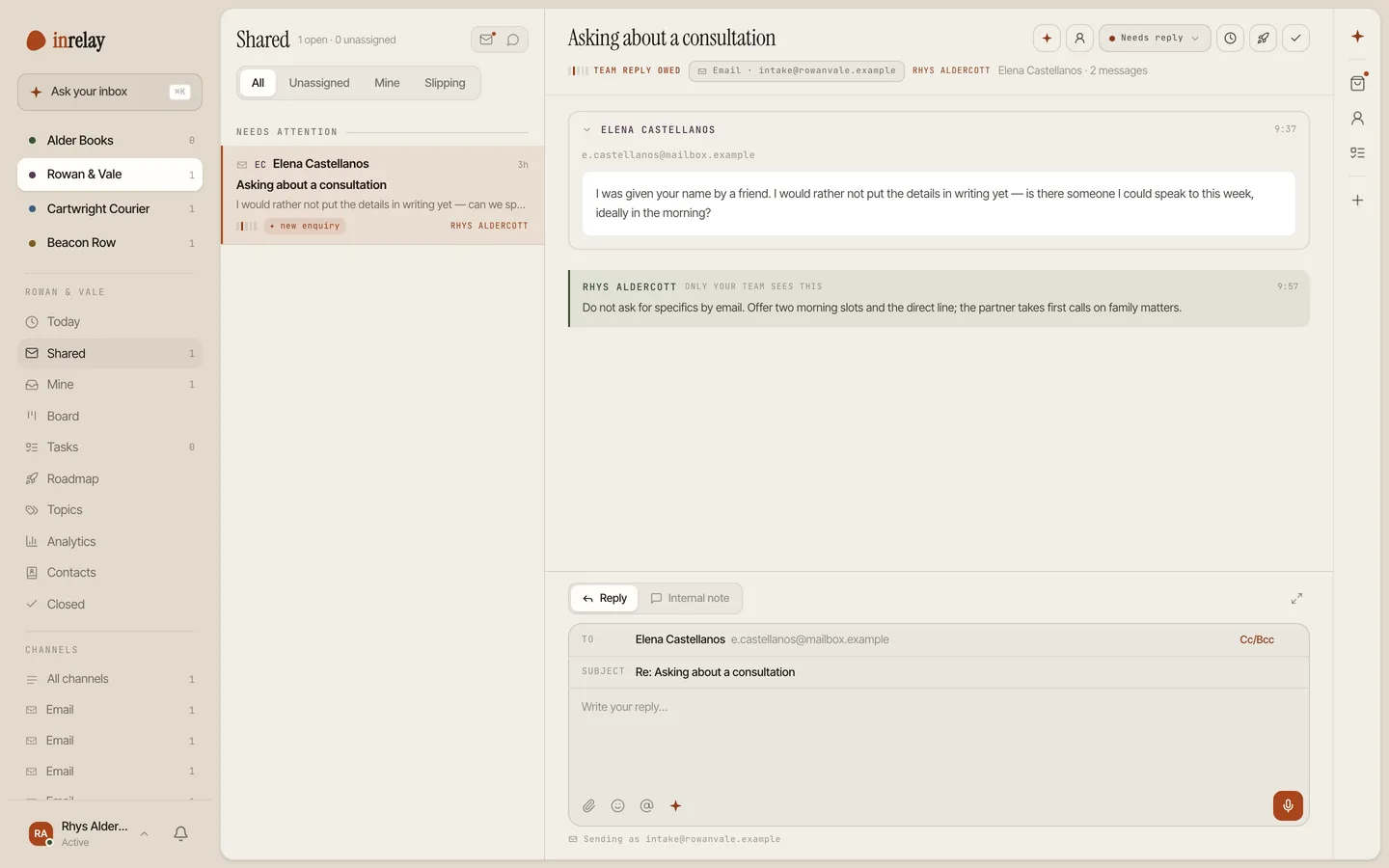
An intake enquiry in the shared inbox, tagged as a new enquiry, with an internal note the client never sees
05 · Integrations

What connects today, honestly.

inrelay does not yet integrate natively with practice-management platforms like Clio, MyCase or PracticePanther, and we won’t pretend otherwise. What it connects is the channel clients actually use: the firm’s email over Gmail, Microsoft 365 or IMAP, plus live chat on your website for intake and a knowledge base for the questions every prospective client asks. Your practice system keeps the matter; inrelay keeps the conversation answered.

Start today

Answer intake first.

Connect the firm’s address in minutes — one flat price, teammates never priced, and a person on every send.

Questions, answered.

Who can see a client’s communications?
Only the people you add to that workspace. Practice groups can run separate workspaces, and the separation is enforced with row-level security in the database, not just hidden in the interface. Internal notes are never visible to clients. The security page states plainly what we do — and which certifications we don’t hold yet.
Will the AI ever reply to a client on its own?
No, and there is no setting that changes that. The agent triages, tags and drafts; a reply only leaves the firm when a person approves it. For a profession where wording binds, approve before send is the product’s hard rule, not an option.
Is inrelay a matter-management system?
No. inrelay handles client communication — intake, ongoing matter email, website chat — with ownership, routing and review. Case files, deadlines-of-record and conflict checks stay in your practice-management system; the two run side by side over email.
Can intake be routed separately from active matters?
Yes. Run intake as its own workspace with its own team, and route by intent: new inquiries to the coordinator, existing-client email to the matter’s assignee. A thread can be reassigned across the firm the moment an engagement letter is signed.

Start running your DMs.

Give your customers faster answers and your team their evenings back.

Desktop and mobile. Free for solo.