For real estate

Shared inbox for real estate teams who answer first

One leads@ the whole office works together — every inquiry owned in minutes, every showing thread with a name on it.

The short answer

The email problem in real estate is speed. A listing inquiry answered in five minutes becomes a showing; the same inquiry answered tomorrow becomes someone else’s client. A shared inbox for real estate gives every inquiry, showing request and transaction thread one owner — so buyers and sellers hear back fast, from exactly one person.

Most offices run leads@ or info@ the same way: one mailbox, one shared password, and whoever happens to be at a desk. Portal notifications pile up under lockbox confirmations, a buyer’s financing question sits unread through an open house, and two agents occasionally answer the same seller with two different showing times.

None of that is anyone’s fault. It’s what a plain mailbox does when a team stands behind it.

01 · What teams need

What real estate teams actually need

Speed-to-lead, evenings and weekends included. Portals send the same buyer to several agents at once, and the first useful reply usually gets the showing. The inquiries that decide a month land on Saturday afternoon, not Tuesday at ten — so the tool has to make the fast reply easy exactly when nobody is at the office.

One owner per buyer and per seller. A transaction is one long conversation that picks up a lender, an inspector and a title company along the way. If three people dip in and out of that thread, details get re-asked and trust leaks. Every buyer and every seller should know whose desk their file is on.

Showing coordination that never drops. Reschedules, confirmations, access instructions — small messages with a big cost when one slips. A showing request that goes stale for a day usually just becomes a showing of a different house.

Answers from the car, not the desk. Agents live at open houses and in traffic between them; software that assumes a desk and a quiet hour doesn’t match how listings get sold.

Fewer repeated answers. HOA fees, school districts, financing steps, utilities — the same questions arrive for every listing, and typing them fresh each time is where evenings go.

02 · The fit

How inrelay fits

inrelay is a shared inbox for real estate teams that turns leads@ into a queue with owners, statuses and — on every plan — a drafted reply waiting for a human to approve. Requirement by requirement:

What real estate teams need
How inrelay meets it
Speed-to-lead on every inquiry
Triage tags each new inquiry by intent and routes it to the right agent’s queue; the AI agent drafts a first reply in your voice, so answering takes one read and one tap to approve.
One owner per buyer and seller
Every conversation carries an assignee by name, and collision detection shows when a colleague is already viewing or replying — two agents never answer the same buyer twice.
Showings that never go stale
Conversations move through new, needs reply, waiting and slipping, so a reschedule that’s been quiet too long surfaces on its own instead of hiding under newer mail.
Answers from the field
The mobile companion handles triage, replies and draft approvals from a phone between showings; deep setup stays on desktop where it belongs.
Fewer repeated answers
A knowledge base on your own domain holds the financing steps and neighborhood answers you type most, and teammates pull from shared snippets for the rest.

Two honest notes. The AI agent — recurring drafts, triage and routing — runs on every plan, including Free, governed by a monthly reply budget you set; if it runs out, the agent pauses and the inbox keeps working. And because pricing is flat per account and teammates are never priced, adding every agent in the office doesn’t add a line to the bill.

03 · One Saturday

A workflow example, start to finish

What one listing inquiry looks like when a shared inbox for real estate is doing its job.
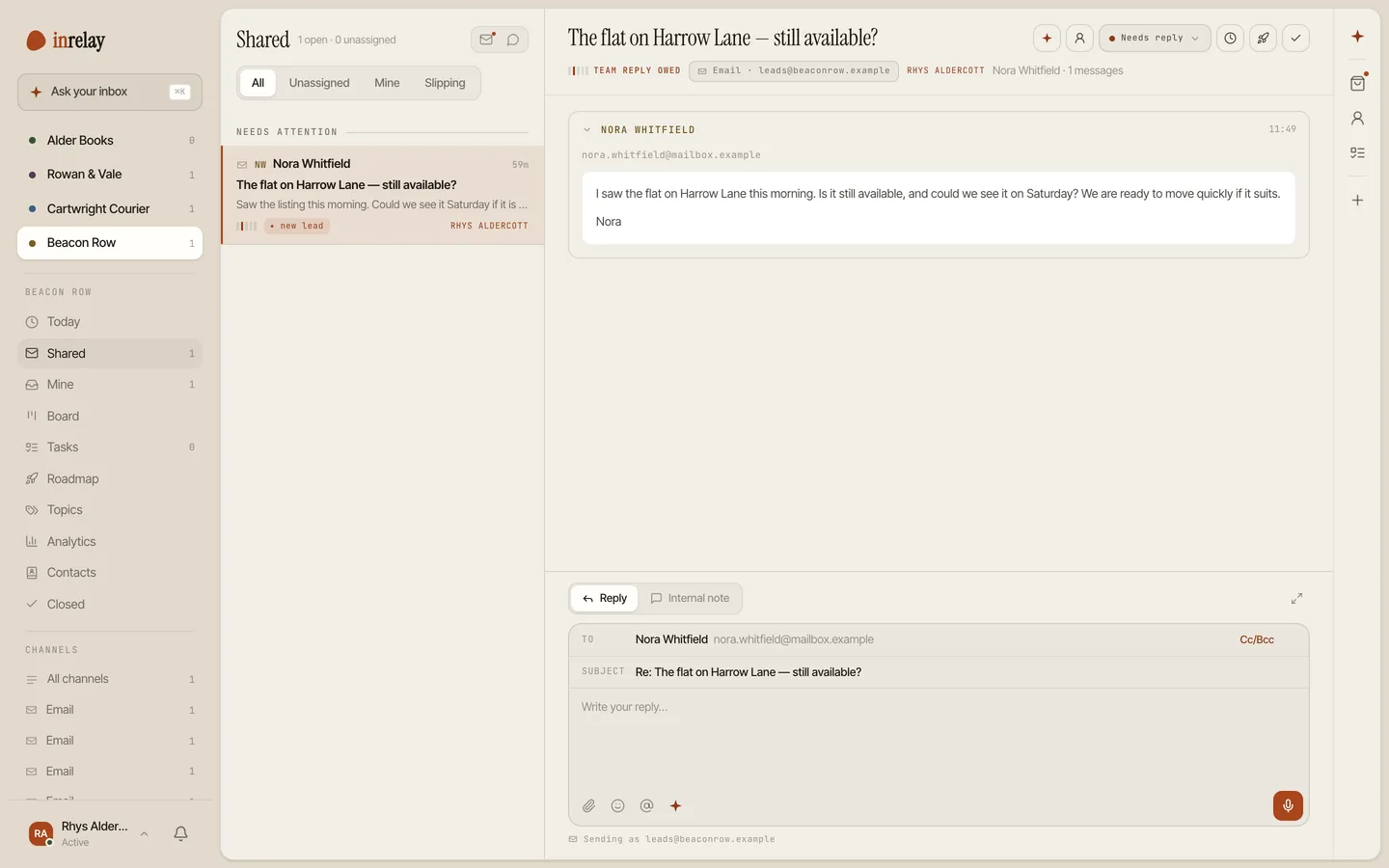
The leads queue with a new-lead tag and owner on a listing inquiry

4:05 pm — the inquiry lands

A buyer asks about a listing through a portal; the notification arrives in leads@. Triage tags it as a new lead and routes it to the listing agent, who is mid–open house across town.

4:07 pm — a draft is waiting

The agent’s phone shows a drafted reply in the team’s voice offering two showing windows tomorrow. She adjusts one time, approves it, and the buyer hears back while other agents’ auto-replies are still promising to be in touch.

Sunday — the thread grows up

The buyer confirms a showing and asks about HOA fees. A teammate opens the thread, sees the owner’s name and a note — “seller reviewing offers Monday” — and leaves it alone.

After the showing — nothing dropped

When the buyer goes quiet for two days, the waiting thread slips to the top of the queue instead of out of memory — and an optional CSAT survey can follow once the file closes.

04 · Integrations

Integrations that matter here

The plain truth: inrelay has no direct MLS, CRM or transaction-management integrations today, and this page won’t pretend otherwise. What it has is the channel almost all real-estate lead flow already runs on — email — which covers more than you’d expect:

  • Portal lead notifications. Zillow-style inquiry emails, showing-service confirmations and sign-call services that notify by email all land in the shared email inbox, get triaged and get an owner like any other conversation.
  • Live chat on your listings site. The chat widget catches the evening browser who wouldn’t have emailed, and the chat lands in the same queue as leads@.
  • A knowledge base on your domain. Buyer and seller guides that answer the repeated questions before they become threads.
  • No direct MLS or CRM sync — tools like Follow Up Boss or Dotloop don’t connect natively today. If your workflow depends on one, tell us which; it genuinely shapes the roadmap.
  • Instagram DM — where plenty of listing interest starts — is in development, not shipped. It appears here when it’s real, not before.
05 · Nearby

Other teams, same shape.

The vertical changes, the mailbox problem doesn’t. See how the same shared inbox fits other kinds of work.

Start today

Answer the 4 pm inquiry by 4:07.

Connect leads@ in minutes — one flat price, every agent in the office on it.

Questions, answered.

Can the whole office work leads@ without sharing a password?
Yes — that’s the core of a shared inbox for real estate. The mailbox is connected once; every agent and coordinator works it through their own login, with assignment, internal notes and collision detection instead of a password taped to a monitor.
How does inrelay help with speed-to-lead?
Three ways: triage tags and routes each inquiry the moment it arrives, the AI agent leaves a drafted reply waiting in your voice on every plan, and the mobile app lets whoever’s on lands approve it from a showing. The reply is fast because a human only has to read and tap, not compose.
Does inrelay integrate with our MLS or CRM?
Not directly, and we’d rather say so than imply otherwise. Anything that reaches you by email — portal lead notifications, showing confirmations — flows in naturally, because it’s email. Native MLS and CRM sync isn’t shipped; if it’s the thing holding you back, tell us.
Will the AI ever reply to a buyer on its own?
No. The agent reads, tags, routes and drafts — a reply only goes out when a person approves it. In a business where one wrong showing time costs a client, that gate is the point; approve-before-send spells out exactly what the AI never does alone.

Start running your DMs.

Give your customers faster answers and your team their evenings back.

Desktop and mobile. Free for solo.