In-app chat

In-app chat support for mobile apps without an SDK

One URL in a WebView, and your customers can reach you from inside your app — no package to install, none to keep updated.

The short answer

In-app chat support lets people message your support team from inside your mobile app instead of leaving it. inrelay serves your chat widget as a hosted full-screen page on your own help-centre address, so any iOS, Android or React Native app can open it in a WebView and get the same conversation, bot and inbox as your website.
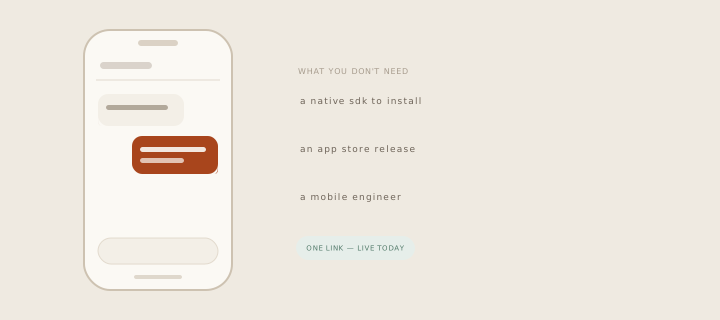
Looping animation: the things you do not need — a native SDK, an app store release, a mobile engineer — fall away, leaving one link that is live today.

What it prevents is the exit. A customer stuck in your app who has to find your website, then your contact page, then an email client, is a customer who mostly gives up — and the ones who do write arrive with no idea which screen they were on or which account they are using.
01 · A page, not a package

How it works in inrelay

Your workspace gets a chat page at your help-centre address. Point a WebView at it and you are done — that is the entire integration.

The hosted chat page inside a phone WebView
  • The same widget, full screen. Not a cut-down mobile variant — the panel your website visitors use, rendered edge to edge, with your knowledge base, your chatbot and your live-chat team behind it.
  • Conversations land in the same inbox. A chat from your app is a thread like any other — assignable, escalatable, part of the same omnichannel queue and the same history.
  • Anonymous works out of the box. Zero parameters, zero key ceremony: the URL alone gives a working conversation.
  • Or pass who they are. Add an email, a name and an opaque token to the URL, and the conversation follows that person across app launches instead of starting over each time.
  • Signed identity when you want it. Switch on verification and your server signs the identity it sends, so nobody can claim to be one of your customers by editing a URL. Off by default, and turning it on is a toggle rather than a migration.
  • It behaves like an app surface, not a web page — not indexed, not in your sitemap, and it returns a plain 404 for any workspace with live chat switched off.
02 · When the app is closed

Where the reply arrives

This is the part most vendors are vague about, so plainly: when your customer has closed the app, your reply reaches them by email. If the conversation has an email address — passed in from your app, or asked for in the chat — the answer is delivered there, and their reply comes back into the same thread.

There are no push notifications in this version. No APNs certificates, no FCM keys, no device tokens to store. That is a genuine limitation and we would rather you read it here than discover it in week two: if silent, instant re-engagement inside your app is the point of the exercise, this is not yet the tool for it.

What it is very good at is the common case — someone with a question while they are using your product, who wants an answer without leaving it, and does not mind hearing back by email if they have moved on.

03 · Set-up

Three recipes

Each integration is about a screen of code, and the same one works for every platform because the thing being embedded is a page.

Copy your chat URL

It is on the Help Widget page in desktop settings, with a copy button, alongside the verification toggle.

Open it in a WebView

WKWebView on iOS, WebView on Android, react-native-webview for React Native. A support button in your app opens the screen; that is the whole surface.

Add identity if you have it

Signed-in app? Append the customer’s email, name and a random opaque token so their history follows them. Skip this and everything still works, anonymously.

Turn on verification when you are ready

Have your server sign the identity before it reaches the WebView. Copy-paste recipes for all three platforms live on the in-app chat setup page.

No plan gate on this one. In-app chat is on every plan — it is the same widget, in a page.

04 · The indie maths

Why it matters

The reason small app teams ship without in-app support is not that they do not want it — and the same is true of every business with an app in front of its customers. It is that the well-known way to get it costs a per-seat platform plus a native SDK per platform, and then keeps costing: every SDK is a dependency you upgrade, a build you re-cut, an App Store review you wait through when the vendor fixes something on their side.

A hosted page removes all of that from your release cycle. Improvements to the chat, the bot and the help centre reach your app the next time somebody opens the screen, because there is no version of us baked into your binary.

05 · Honest about the shape

How inrelay does it differently

We are not claiming a native SDK. This is a hosted chat page you put in a WebView, and it is worth knowing that several of the vendors who do ship SDKs started exactly here — the first Android SDK from at least one well-known chat product was a WebView around their hosted chatbox.

What we have done instead of writing the wrapper is take the identity model seriously from day one. Signed identity exists before anyone needs it, because retrofitting verification after your customers have embedded an unverified URL is the documented pain of doing this the other way round. The token that restores a conversation is opaque and random by instruction, and with verification switched on a signature covering one customer’s details will not validate for another’s.

And when a signature is wrong or missing, the chat still opens. It just treats the visitor as anonymous rather than failing — because a support button that errors is worse than a support button that has forgotten who you are.

06 · Close neighbours

Works with the rest of the inbox.

In-app chat is one piece of the inrelay feature family — these are its closest neighbours.

Start today

Support that lives inside your app.

Free to start with your own inbox — every feature, no card, never per seat.

Questions, answered.

How long does it actually take to add?
An afternoon, and most of that is deciding where the support button goes. Copy your chat URL from the Help Widget settings page, open it in a WebView, ship. Adding identity is a query string; turning on verification is one server-side signature. All three platform recipes are on the in-app chat setup page.
Are there push notifications?
No — not in this version, and we would rather say so than imply otherwise. When your customer has left the app, your reply reaches them by email and their answer comes back into the same thread. Push, and the native wrapper that would carry it, wait on real demand rather than a roadmap slide.
Is a WebView good enough for support chat?
For a support screen, yes — it is one full-screen surface a customer opens deliberately, not a component threaded through your UI. You trade native polish on that one screen for no SDK, no dependency upgrades and no App Store round-trip when the chat improves. If your support surface needs to be woven into your own interface, an SDK is the honest answer and we don’t have one.
Can someone impersonate one of my users?
With verification off — the default — anyone holding a conversation token could resume that conversation, which is why the tokens must be random and opaque. Switch verification on and your server signs the identity, the signature covers every identity field, and one customer’s signature will not validate another’s details.

Start running your DMs.

Give your customers faster answers and your team their evenings back.

Desktop and mobile. Free for solo.