AI copilot

AI email reply generator for shared inboxes

Every reply drafted in your voice, from the whole conversation — and nothing sends until you approve it.

The short answer

inrelay’s AI email reply generator reads the whole conversation and drafts a reply in your voice — built from the thread, the customer’s history and your knowledge base. Every draft then waits for a teammate to approve it. The AI writes; a human decides what sends.
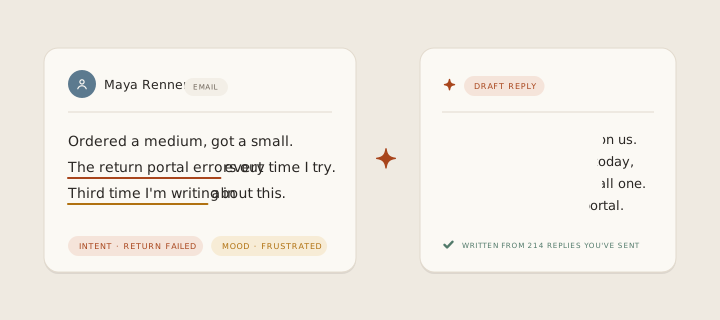
Looping animation: the copilot reads Maya’s thread, tags the intent as a failed return and the mood as frustrated, then writes a reply drawn from the replies you have already sent.

Most AI email tools promise to answer your customers for you. inrelay’s AI email reply generator makes a quieter promise: every reply already written when you sit down, and none of them sent without you. Drafting in your voice, with an approval gate built into the product rather than bolted on — that trade is the whole design.

01 · The draft

How it works in inrelay

When a message arrives — by email or in live chat, and on the social channels as they land — the agent reads it in context: what the customer asked before, what the rest of the thread says, what your help articles already answer. Then it writes the reply the way you would have written it, and files the draft on the thread.

The draft sits in the composer until someone reviews it. Edit it, approve it, or throw it away — approving is one action, and until it happens the customer has received nothing. On desktop, the Copilot panel opens beside the thread, so you can ask for a shorter version or a different angle without losing your place. On mobile, you can read, tweak and approve drafts from wherever you are.

Each draft is built from:

  • The full thread, not just the last message.
  • Contact context — who this customer is and what they’ve asked before.
  • Your voice profile and saved snippets.
  • Your knowledge base and sources, so drafts agree with your published help — each source carrying its own switch for whether the agent may draw on it.
  • Live order data from your store isn’t wired in yet — commerce lookups are on the roadmap, not in the product.

Left alone overnight, the agent keeps working: it triages, drafts and files, then meets you with a short morning brief — what’s ready to approve, and the few conversations that genuinely need you first.

02 · The blank page

Why it matters

A shared inbox full of unanswered messages is really a stack of small writing assignments. Each one carries a blank-page cost, and at 11pm, after the fortieth DM, that cost is what turns into short, cold answers — or no answer at all.

Canned templates remove the effort and lose the person: customers can tell when reply number four hundred was pasted. A reply generator that starts from your actual voice and the actual thread removes the effort without flattening the tone. And because every teammate approves from the same drafts, a team of five sounds like one shop — not five moods.

03 · The trust bet

How inrelay does it differently

The category is racing toward autonomy: bots that resolve tickets on their own and bill you per resolution. inrelay is built on the opposite bet — that for a small shop, trust is the product, and no saved minute is worth a wrong send.

So the approval gate is the default, and autonomy is a dial you raise deliberately, per workspace. In suggest mode the agent only proposes. In assist mode it handles safe internal work on its own — tagging, filing, routing — while every customer-visible reply still waits for a person. Only if you choose autopilot do routine replies send unattended, and even then the high-stakes ones — refunds, upset customers, VIPs — always stop and ask a human. The full mechanics, including exactly what the agent never does without you, are on the approve-before-send page.

04 · Set-up

Setting up, in four steps

Connect a channel

Start with your support email address; add live chat and DMs whenever you’re ready.

Teach it your voice

Set the tone, add your snippets, point it at your knowledge base. Drafts get better the more of you they have to work from.

Choose an autonomy mode

Every workspace starts in suggest mode. Raise the dial only when you trust what you’re reading.

Approve your first drafts

Open a thread, read the draft, edit if you like, approve. That’s the whole loop.

Step-by-step detail lives in the help centre.

05 · Two different jobs

The copilot, and the chatbot

inrelay has two pieces of AI that face in opposite directions, and it is worth being clear about which is which.

The copilot is this page: it works on your side of the conversation. It reads threads, drafts replies in your voice and hands them to you — on email and tickets, nothing it writes reaches a customer until a person approves it.

The chatbot faces the customer, in live chat, and answers by itself — strictly from your published articles and sources, declining the subjects you mark off-limits and handing the conversation to a named teammate when it should. It is the surface where a machine does talk to your customer, which is exactly why it is fenced the way it is.

Same knowledge, same voice, same inbox. Different amount of leash, chosen by you per surface rather than by us.

06 · The rest of the job

Drafting is one third of the job.

The same agent sorts and routes the inbox, and the inbox keeps your team out of each other’s way. See everything inrelay does.

Start today

Let the agent draft. You decide.

Free to start with your own inbox — every feature, no card, never per seat.

Questions, answered.

Will the AI email reply generator send anything without approval?
Not unless you deliberately raise the autonomy dial for a workspace. By default every draft waits for a human, and high-stakes replies — refunds, upset customers, VIPs — always do, even in autopilot mode. The model is spelled out at approve-before-send.
How does it learn to write in my voice?
From context you control: a voice profile you set up, your saved snippets, your knowledge base, and the thread itself. Because drafts start from your material rather than a generic template, they read like you on a good day — and every edit you make before approving is a correction you’d have typed anyway.
Which plan includes the reply generator?
Every plan, including the free one. The full agent — drafting, triage, routing, Ask AI answers — is on Solo, Team and Studio alike, governed by a monthly reply budget you set and can see. When the budget runs out the agent pauses and the inbox keeps working — no overage fees, no silent upgrades. Details on the pricing page.

Start running your DMs.

Give your customers faster answers and your team their evenings back.

Desktop and mobile. Free for solo.